1
/
ل
1
شارك مع أصدقائك للحصول على نقاط
سعر عادي
280
.68
AED
سعر البيع
346.05 AED
سعر الوحدة
/
تخفيضات
يتم احتساب الشحن عند الدفع.
كمية محدودة
تعذر تحميل مدى توفر الطلب
Size: 240mm x 60mm x 195mm
Battery: Li-ion Battery 3.7V 1,200mA rechargeable
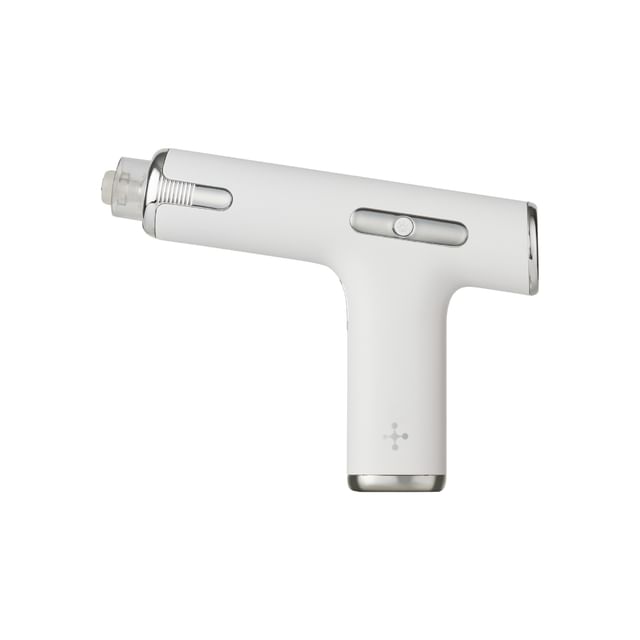
This Meliturn Shot Gun comes with:
Meliturn Shot Gun Main Body 1 pc
Cartridge 4 pcs
Adapter 1 pc
USB charging cable 1 pc
User Manual (Korean) 1 pc
Benefits:
An at-home skincare device that helps improve pigmented spots on the skin.
Features 2 types of LED lights with different wavelengths to promote better absorption of active ingredients to achieve healthy, vibrant skin.
The exclusive cartridge helps increase the infusion of LED light into the skin.
Designed with 2 vibration modes that stamp on the skin to enhance absorption of the ampoule, and the vibration intensity can be adjusted based on your needs.
Guide for each LED mode:
1. Green: Helps cleanse and brightens the skin surface with 520(±10)nm wavelength green LED.
2. Red: Penetrates deep into the skin to improve pigmentation and dull skin with 660(±10)nm wavelength red LED.
Guide for each vibration mode:
1. L Mode: A low-intensity mode that delivers up to 2,500 stamps per minute for better ampoule absorption.
2. H Mode: A high-intensity mode that delivers up to 3,500 stronger stamps per minute to promote deep absorption of the ampoule.
How to use:
1. Before first-time use, fully charge the Meliturn Shot Gun until the 5 battery indicator lights are on.
2. Dispense a small amount of Meliturn Ampoule into the cartridge and seal with the air pump of the cartridge. The amount of the Meliturn Ampoule can be adjusted according to your needs.
3. Shake the cartridge gently for around 5 times for the Meliturn Ampoule entering the air pump. Hold the air pump with the top of the cartridge facing up while shaking to prevent leakage.
4. Attach the cartridge into the device when the device turned off.
5. Press and hold the Power/Mode Button for more than 3 seconds to turn on.
6. The vibration mode is set as L mode automatically when the device is turned on. Press the Power/Mode Button to change the vibration mode.
7. Press the LED button once to change the LED setting.
8. For small, pigmented spots care, first apply 5 stamps to the concerned area in L mode with Green LED first. Then apply 5 other stamps to the concerned area in H mode with Red LED.
9. For a bigger pigmented spot care, first apply 10 stamps to the concerned area in L mode with Green LED first. Then apply 10 other stamps to the concerned area in H mode with Red LED.
10. For a large area care, first apply 20 stamps to the concerned area in L mode with Green LED first. Then apply 15 other stamps to the concerned area in H mode with Red LED.
11. Press and hold the Power/Mode Button for more than 3 seconds to turn off the device after use.
12. Apply Meliturn Ampoule to the entire face evenly after using the device.
*Please use the device with Meliturn Ampoule.
*When using the device on the skin, please apply it with weak pressure so that only a very faint contact sound can be heard.
*If the ampoule is not being dispensed properly during use, please lightly shake the device up and down with the cartridge chip on top.
*Dispose of the cartridge after use as it is for single use only.
*Fully recharge the device every 3 months, even if it is not being used.
*Do not use the device if your skin is sensitive to light or if you are using light-sensitive medications.
*Do not use the device if you are a child, pregnant, breastfeeding, or have an implanted medical device.
*Do not use the device immediately after laser treatments, chemical peels, or plastic surgery.
Manufacturer’s Warranty Period and Details:
This product (Cellology - Meliturn Shot Gun) is covered by a manufacturer’s warranty that expires 12 months from its shipment date.
During the warranty period, customers will be entitled to free repair service if the defective item is caused by non-human factors and within scope of warranty.
Repair for defective item will be charged after the warranty period.
Within Scope of Warranty: Limited to malfunctions occurred during normal use.
Out of Scope of Warranty: For malfunction or damage resulting from human factors listed below:
Any improper use and damage caused by accident or improper storage of the device (e.g. device dropped), any usage of the product not in the way as described in the user’s manual;
Alteration of the appearance or replacement of the product parts or dismantlement of the device on your own resulting in the device failing to function normally;
Any usage of the product not in the way as described in the user’s manual;
Repair by an unauthorized manufacturer or third party.
Battery: Li-ion Battery 3.7V 1,200mA rechargeable
This Meliturn Shot Gun comes with:
1. Green: Helps cleanse and brightens the skin surface with 520(±10)nm wavelength green LED.
2. Red: Penetrates deep into the skin to improve pigmentation and dull skin with 660(±10)nm wavelength red LED.
Guide for each vibration mode:
1. L Mode: A low-intensity mode that delivers up to 2,500 stamps per minute for better ampoule absorption.
2. H Mode: A high-intensity mode that delivers up to 3,500 stronger stamps per minute to promote deep absorption of the ampoule.
How to use:
1. Before first-time use, fully charge the Meliturn Shot Gun until the 5 battery indicator lights are on.
2. Dispense a small amount of Meliturn Ampoule into the cartridge and seal with the air pump of the cartridge. The amount of the Meliturn Ampoule can be adjusted according to your needs.
3. Shake the cartridge gently for around 5 times for the Meliturn Ampoule entering the air pump. Hold the air pump with the top of the cartridge facing up while shaking to prevent leakage.
4. Attach the cartridge into the device when the device turned off.
5. Press and hold the Power/Mode Button for more than 3 seconds to turn on.
6. The vibration mode is set as L mode automatically when the device is turned on. Press the Power/Mode Button to change the vibration mode.
7. Press the LED button once to change the LED setting.
8. For small, pigmented spots care, first apply 5 stamps to the concerned area in L mode with Green LED first. Then apply 5 other stamps to the concerned area in H mode with Red LED.
9. For a bigger pigmented spot care, first apply 10 stamps to the concerned area in L mode with Green LED first. Then apply 10 other stamps to the concerned area in H mode with Red LED.
10. For a large area care, first apply 20 stamps to the concerned area in L mode with Green LED first. Then apply 15 other stamps to the concerned area in H mode with Red LED.
11. Press and hold the Power/Mode Button for more than 3 seconds to turn off the device after use.
12. Apply Meliturn Ampoule to the entire face evenly after using the device.
*Please use the device with Meliturn Ampoule.
*When using the device on the skin, please apply it with weak pressure so that only a very faint contact sound can be heard.
*If the ampoule is not being dispensed properly during use, please lightly shake the device up and down with the cartridge chip on top.
*Dispose of the cartridge after use as it is for single use only.
*Fully recharge the device every 3 months, even if it is not being used.
*Do not use the device if your skin is sensitive to light or if you are using light-sensitive medications.
*Do not use the device if you are a child, pregnant, breastfeeding, or have an implanted medical device.
*Do not use the device immediately after laser treatments, chemical peels, or plastic surgery.
Manufacturer’s Warranty Period and Details:
This product (Cellology - Meliturn Shot Gun) is covered by a manufacturer’s warranty that expires 12 months from its shipment date.
During the warranty period, customers will be entitled to free repair service if the defective item is caused by non-human factors and within scope of warranty.
Repair for defective item will be charged after the warranty period.
Within Scope of Warranty: Limited to malfunctions occurred during normal use.
Out of Scope of Warranty: For malfunction or damage resulting from human factors listed below: