1
/
ل
1
شارك مع أصدقائك للحصول على نقاط
سعر عادي
1,372
.95
AED
سعر البيع
1,667.79 AED
سعر الوحدة
/
تخفيضات
يتم احتساب الشحن عند الدفع.
كمية محدودة
تعذر تحميل مدى توفر الطلب
Size: 60 x 200 x 36mm
Battery: Lithium-ion 3.6V / 3500mAh rechargeable
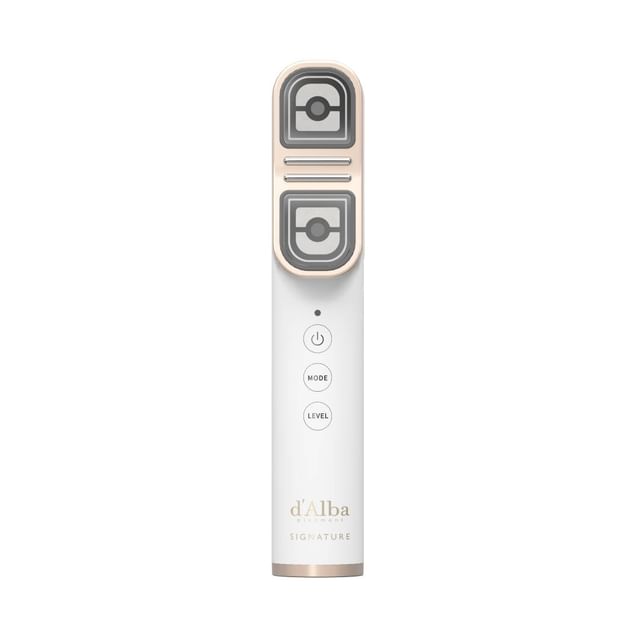
This Signature Allthera Double Shot comes with:
Signature Allthera Double Shot Main Body 1 pc
USB Cable 1 pc
Product Holder 1 pc
User Guide (English and Korean) 2 pcs
Benefits:
A 3-in-1 skincare device designed to address multiple skin concerns.
Powered by the exclusive Truffle Synergy Shot, it penetrates deep into the dermis layer to support collagen activation and promote visible results of showing up to a 175% increase in collagen-boosting effectiveness.
Featuring RF and dual ultrasonic waves, it helps replenish collagen, delivers soothing warmth to the deeper layers of the skin, and enhances elasticity and product absorption.
The device helps lift and firm areas prone to sagging, such as the forehead, eye area, smile lines, jawline, under-chin, cheeks, and upper arms.
It also helps tighten pores and revitalize skin appearance, providing improved absorption compared to hand application.
Guide for each mode:
1. Intensive Care Mode: Boosts skin elasticity and enhances product absorption by supporting collagen production and lifting sagging skin.
2. Free-Shot Care Mode: Helps sculpt and firm body contours such as the upper arm area.
3. Cooling Care Mode: Soothes the skin and tightens pores by lowering skin temperature.
How to use:
1. Hold the Power Button for more than 1 second to turn on the device.
2. Press the Mode Button for more than 3 seconds to switch the language among Korean, English, Chinese, and Japanese. Press the Level Button for 3 seconds to mute the device.
3. The device will start in Intensive Care Mode, indicated by a red LED light on the skin contact surface.
4. Short-press the Mode Button to switch to the Free-Shot Care Mode with a magenta LED light or the Cooling Care Mode with a blue LED light.
5. The default setting is Level 1 once the device is activated. Press the Level Button to change to your desired level between Level 1 and Level 5 while using Intensive Care Mode or Free-Shot Care Mode.
6. Cleanse the skin and apply skincare products generously before using the device for optimized energy delivery.
7. For Intensive Care Mode, follow the voice guidance and press the head of the device against your skin. Press the Shot Button to release shots. Wait for three vibrations over two seconds, which indicate that the shot is being delivered. Each session includes 40 shots. Move the device across the area in the following order: left cheek - right cheek - forehead - jawline - chin - neck.
8. For Free-Shot Care Mode, target desired body areas such as the upper arms, abdomen, or thighs, as well as the face. The device will automatically stop after 40 shots. Keep the device firmly in contact with the skin until the third vibration ends for optimal results.
9. For Cooling Care Mode, press the head of the device against your skin and slowly move it while massaging for 3 minutes.
10. Recommended for use 1–3 times daily.
11. After use, clean the device gently using a soft, dry cloth.
*Do not use the device on thin or delicate skin such as the philtrum (above the upper lip), eyelids, or thyroid area (hormone-sensitive zone), or on areas with recent cosmetic procedures (within 2 months), breakouts, wounds, or scars.
*Do not use if you are pregnant, breastfeeding, have a weakened immune system, use a pacemaker or other implanted medical devices, or are under 12 years old.
Battery: Lithium-ion 3.6V / 3500mAh rechargeable
This Signature Allthera Double Shot comes with:
1. Intensive Care Mode: Boosts skin elasticity and enhances product absorption by supporting collagen production and lifting sagging skin.
2. Free-Shot Care Mode: Helps sculpt and firm body contours such as the upper arm area.
3. Cooling Care Mode: Soothes the skin and tightens pores by lowering skin temperature.
How to use:
1. Hold the Power Button for more than 1 second to turn on the device.
2. Press the Mode Button for more than 3 seconds to switch the language among Korean, English, Chinese, and Japanese. Press the Level Button for 3 seconds to mute the device.
3. The device will start in Intensive Care Mode, indicated by a red LED light on the skin contact surface.
4. Short-press the Mode Button to switch to the Free-Shot Care Mode with a magenta LED light or the Cooling Care Mode with a blue LED light.
5. The default setting is Level 1 once the device is activated. Press the Level Button to change to your desired level between Level 1 and Level 5 while using Intensive Care Mode or Free-Shot Care Mode.
6. Cleanse the skin and apply skincare products generously before using the device for optimized energy delivery.
7. For Intensive Care Mode, follow the voice guidance and press the head of the device against your skin. Press the Shot Button to release shots. Wait for three vibrations over two seconds, which indicate that the shot is being delivered. Each session includes 40 shots. Move the device across the area in the following order: left cheek - right cheek - forehead - jawline - chin - neck.
8. For Free-Shot Care Mode, target desired body areas such as the upper arms, abdomen, or thighs, as well as the face. The device will automatically stop after 40 shots. Keep the device firmly in contact with the skin until the third vibration ends for optimal results.
9. For Cooling Care Mode, press the head of the device against your skin and slowly move it while massaging for 3 minutes.
10. Recommended for use 1–3 times daily.
11. After use, clean the device gently using a soft, dry cloth.
*Do not use the device on thin or delicate skin such as the philtrum (above the upper lip), eyelids, or thyroid area (hormone-sensitive zone), or on areas with recent cosmetic procedures (within 2 months), breakouts, wounds, or scars.
*Do not use if you are pregnant, breastfeeding, have a weakened immune system, use a pacemaker or other implanted medical devices, or are under 12 years old.